To choose a frame and mat online, upload a photo of your art to the Framers Market & Gallery Virtual Framer, enter its size, then pick a moulding, a framing method and your mat widths and colors while the preview updates around your image. You finish by sending the design to the shop as a quote request.
The tool gives you a lot of choices, which is great until it isn’t. This guide walks through each screen in order, with the advice Vickie Sheridan, owner and Certified Picture Framer at Framers Market & Gallery in Prescott, gives customers at the design table: let the art make the decisions, and keep the frame from competing with it.
Step 1: Upload and crop your image
Start on the Virtual Framer page. The upload box is the first thing you see.
- Drag your photo in, or click Browse File
- Drag the corner handles to the edges of the art
- Rotate or remove the background if needed, then click the check mark
A straight-on photo in soft daylight gives the most honest colors. If the art is still in an old frame, crop to the image itself so the preview isn’t stacking a new frame on the old one.
Step 2: Pick a category, size and value
Next, the tool asks what you are framing. This shapes the options it shows you.
- Choose a category, such as Photograph, Print, Painting on canvas, Jersey or Needle point
- Enter height and width in inches, with fractions if you need them
- Mark the piece as very valuable, moderately valuable or inexpensive
Be honest about value. A family photo that can’t be replaced is “very valuable” even if it cost nothing. If the shop has saved suggested designs for your category, you will see them here. If not, click Design from scratch.
Step 3: Choose your moulding
The frame list fills the left side of the screen. Each frame has a reference code you can note for later.
- Use Filters to narrow by color, type, size, thickness or brand
- Click a frame to see it on your art right away
- Heart your favorites, then click Compare to view them side by side
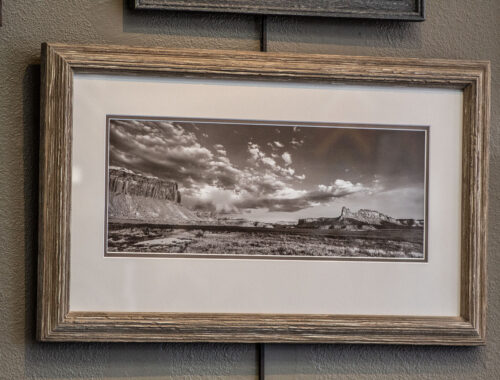
A quick rule: pull the frame color from something small in the art, not the biggest color block. A thin dark line around a busy print often looks better than an ornate gold profile. The shop keeps wood and metal moulding from simple to ornate, as the custom framing page lays out.
Step 4: Pick a framing method
The right-hand panel lists framing methods, shown as small cross-section drawings. This is where you decide how many mats you want and how the art sits in the frame.
- Mat and Glass, 2 Mat & Glass or 3 Mat & Glass for classic matting
- Float & glass or a spacer option to keep art off the glass
- Box or acrylic box options for objects with depth
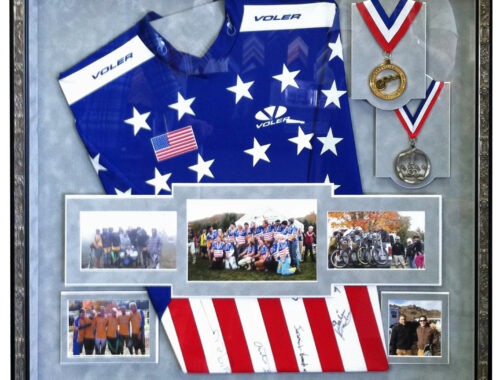
Pastels, charcoals and anything with texture should never touch the glass, so a spacer or float method is worth a look. For jerseys, medals and keepsakes, read our post on shadow box framing in Prescott.
Step 5: Set mat widths and colors
After you choose a matted method, a panel opens for each mat layer, labeled A, B and so on.
- Slide the ruler to set each layer’s width in inches
- Click Select matboard to browse colors by name and code
- Keep the top mat neutral and use the inner layer for a thin accent
Wider mats give small pieces room to breathe. Acid-free mats matter for anything you want to keep; the Library of Congress photo care guidance stresses photo-safe, low-acid materials and limited light exposure for photographs.
Step 6: Note what to ask the shop
A few choices are best settled with a framer, and the shop handles all of them in-house:
- Glass type, such as UV-protective glass for fade-prone art
- Fillets, the thin inner line between mat and art
- Fabric-wrapped mats, liners or multiple openings
Call (928) 445-2174 or reach out through the contact page to talk through any of these.
Step 7: Request your quote
When the preview looks right, click Request Quote above the image. Fill in your name, phone and email, verify your email with the code the tool sends, and click Send request. That’s the whole process to choose a frame and mat online. Ready to start? Open the Virtual Framer and design your frame tonight.
About the author
Vickie Sheridan owns Framers Market & Gallery at 377 N. Montezuma St. in Prescott, Arizona. She is a Certified Picture Framer and a watercolorist who has framed her own work for years. More on the Our Company page.
Citations and resource links
- Framers Market & Gallery: Virtual Framer
- Framers Market & Gallery: Custom Framing
- Framers Market & Gallery: Shadow Box Framing in Prescott
- Library of Congress: Care, Handling and Storage of Photographs
- Framers Market & Gallery: Contact Us